Raspberry Pi OLED Screen Add-On
sku LCD-CB4003 · categoríacategory displays
factura o tiquete electrónicoprice in USD
electronic invoice or receipt
quedan 44 left — envíos desde San José— ships from San José
cantidadquantity
- [✓] Envío desde San José, CR: por Correos de Costa Rica, o retiro en Centro Colón. Costo y plazo en el checkout.Ships from San José, CR: by Correos de Costa Rica, or pickup at Centro Colón. Cost and timing at checkout.
- [✓] Envío gratis con Correos en pedidos desde $200.00 antes de IVA.Free shipping by Correos on orders of $200.00 or more before VAT.
- [✓] Factura electrónica: pídala en el checkout con su cédula o la de su empresa.Electronic invoice: ask for it at checkout with your ID or your company's.
- [✓] PagoPayment: Tarjeta de crédito o débito (Tilopay)Credit or debit card (Tilopay) · Compra-Click (enlace de pago por correo)Compra-Click (payment link by email) · Pagar al retirar en Centro Colón (datáfono)Pay at pickup in Centro Colón (card terminal) · SINPE MóvilSINPE Móvil · Depósito o transferencia bancariaBank deposit or transfer.
- [✓] CuentaAccount: para comprar se inicia sesión.needed to check out. Crear cuentaCreate an account
- [✓] ¿Dudas?Questions? contacto y soportecontact and support
$ cat specs.txt
- tamaño de pantallascreen size
- 0.96''0.96''
- resoluciónresolution
- 128*64128*64
- chip controladordriver chip
- SSD1306SSD1306
- compatibilidadcompatibility
- Raspberry PiRaspberry Pi
- tamaño del pcbpcb size
- 48.35mm X 48.47mm X1.6mm48.35mm X 48.47mm X1.6mm
- interfazinterface
- RPI 26pins Interface X2, UARTRPI 26pins Interface X2, UART
- voltaje de alimentación (vdd)supply voltage (vdd)
- 3 V mín, 3.3 V típ, 3.5 V máx3 V min, 3.3 V typ, 3.5 V max
- voltaje de entrada alto (vih)input high voltage (vih)
- 0.8XVDD – VDD0.8XVDD – VDD
- voltaje de entrada bajo (vil)input low voltage (vil)
- 0 – 0.2XVDD0 – 0.2XVDD
- corriente de operación (idd)operating current (idd)
- 180 uA típ, 300 uA máx180 uA typ, 300 uA max
a agregar al carritoadd to cart← → fotosphotosg c ir al carritogo to cart
En el mercado de hardware de código abierto existen pocos complementos OLED diseñados específicamente para Raspberry Pi. En muchos proyectos solo se necesita mostrar un poco de información, como el estado del sistema o la IP. Además, cuando se requiere una alta portabilidad, no es conveniente conectar una pantalla grande a la Raspberry Pi mediante la interfaz HDMI. Por eso, un pequeño complemento OLED puede satisfacer esta necesidad.
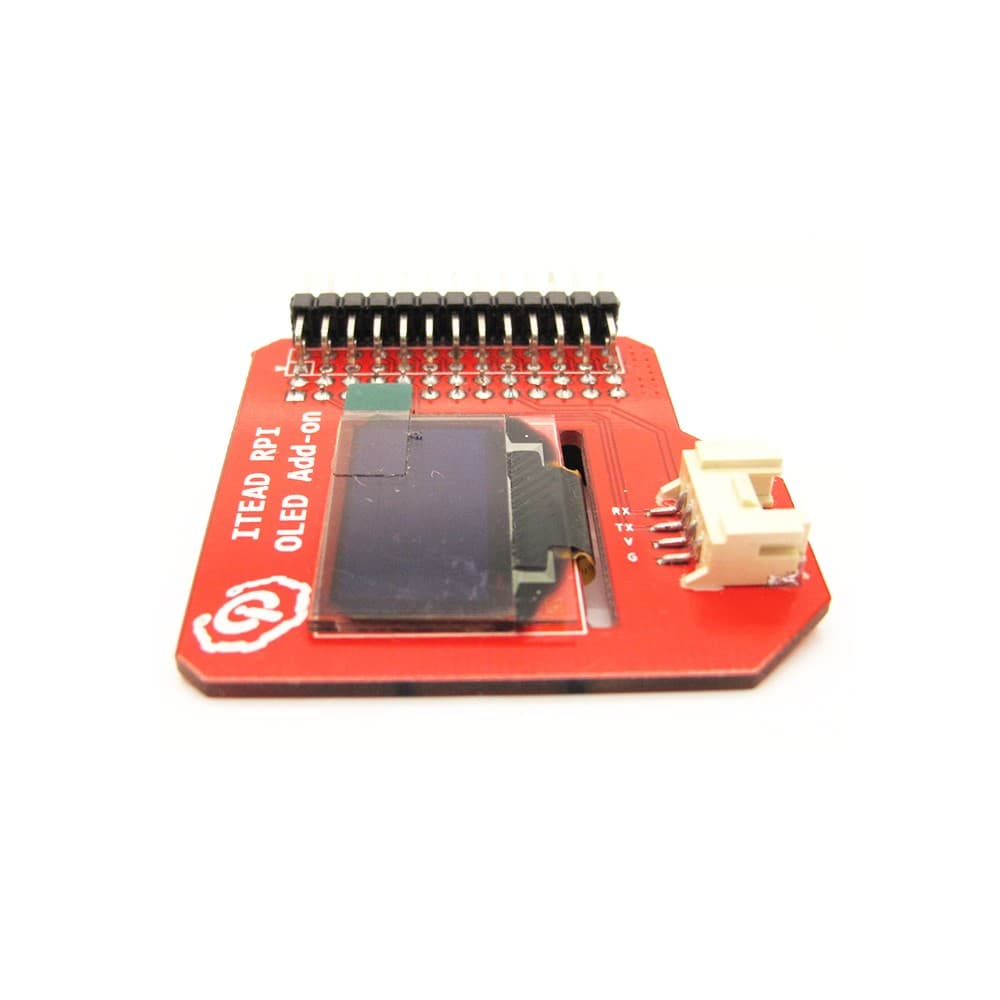
El complemento OLED, con pantalla OLED integrada de 0.96’’ 128*64 y chip controlador SSD1306, está diseñado para Raspberry Pi. Cada píxel de la pantalla OLED puede encenderse o apagarse individualmente mediante este chip controlador SSD1306.
No solo ofrecemos un complemento fácil de conectar a la Raspberry Pi, sino que también proporcionamos un SDK que le ayuda a portar el driver de Arduino a la Raspberry Pi. Después de instalar el SDK, puede controlar este complemento tan fácilmente como lo haría en Arduino.
Especificaciones
| Tamaño del PCB | 48.35mm X 48.47mm X1.6mm |
| Interfaz | Interfaz RPI de 26 pines X2, UART |
Características eléctricas
| Característica | Símbolo | Mín | Típ | Máx | Unidad |
| Voltaje de alimentación | VDD | 3 | 3.3 | 3.5 | V |
| Voltaje de entrada alto | VIH | 0.8XVDD | - | VDD | V |
| Voltaje de entrada bajo | VIL | 0 | - | 0.2XVDD | V |
| Corriente de operación para VDD | IDD | - | 180 | 300 | uA |
Hardware


Mapa de pines
| Índice de pin | Nombre de pin | Pin OLED 2864 | Descripción |
| 1 | 3V3 | - | |
| 2 | 5V | - | |
| 3 | SDA | SDA | |
| 4 | 5V | - | |
| 5 | SCL | SCL | |
| 6 | GND | - | |
| 7 | GPIO7 | UART TXD | |
| 8 | TXD | ||
| 9 | GND | ||
| 10 | RXD | UART RXD | |
| 11 | GPIO0 | ||
| 12 | GPIO1 | ||
| 13 | GPIO2 | ||
| 14 | GND | ||
| 15 | GPIO3 | ||
| 16 | GPIO4 | RST# | |
| 17 | 3V3 | ||
| 18 | GPIO5 | ||
| 19 | MOSI | ||
| 20 | GND | ||
| 21 | MISO | ||
| 22 | GPIO6 | ||
| 23 | SCK | ||
| 24 | CE0 | ||
| 25 | GND | ||
| 26 | CE1 |
Instrucciones
- Conecte el complemento OLED a la Raspberry Pi y aliméntela
- modifique el archivo /etc/modprobe.d/raspi-balcklist.conf
- código modificado como se muestra a continuación (reemplace ^ por #)
- ^blacklist spi-bcm2708
- ^blacklist i2c-bcm2708
- modifique /etc/modules
- agregue una línea al final como se muestra a continuación:
- i2c-dev
- reinicie
- Descargue el SDK desde este enlace: https://github.com/iteadsw/SDK y luego instálelo
- Ingrese al directorio libraries/itead_SSD1306/examples/oled_Animation_Sample/, modifique el archivo oled_Animation_Sample.ino y cambie el parámetro OLED_RESET como se muestra a continuación:
- define OLED_RESET 16
- Comando para compilar oled_Animation_Sample.ino
- $ iteadcompile OLED oled_Animation_Sample.ino
- Comando para ejecutar el programa
- $ sudo ./OLED
- Cuando termine la compilación, podrá ver un pequeño muñeco bailando en la pantalla OLED.

There are seldom OLED add-ons customized for Raspberry Pi in the open source hardware market. In a lot of projects, we only need to display little information such as the state of system or IP. What’s more, when we have a high requirement for its portability, it’s unsuitable to connect a big screen to Raspberry Pi via HDMI interface. Thus, a tiny OLED add-on can satisfy this demand.
OLED add-on with built-in 0.96’’ 128*64 OLED and SSD1306 control chip is customized for Raspberry Pi. Every single pixel in OLED can be lighted up or off by this SSD1306 control chip.
We not only offer an easily-plugged add-on for Raspberry Pi, but also provide an SDK that help you transplant Arduino’s driver into Raspberry Pi. After installing the SDK, you can drive this add-on as easily as you do on Arduino.
Specification
| PCB size | 48.35mm X 48.47mm X1.6mm |
| Interface | RPI 26pins Interface X2,UART |
Electrical Characteristics
| Characteristics | Symbol | Min | Typ | Max | Unit |
| Power supply voltage | VDD | 3 | 3.3 | 3.5 | V |
| High input voltage | VIH | 0.8XVDD | - | VDD | V |
| Low input voltage | VIL | 0 | - | 0.2XVDD | V |
| Operation current for VDD | IDD | - | 180 | 300 | uA |
Hardware
Pin Map
| Pin Index | Pin Name | OLED 2864 pin | Description |
| 1 | 3V3 | - | |
| 2 | 5V | - | |
| 3 | SDA | SDA | |
| 4 | 5V | - | |
| 5 | SCL | SCL | |
| 6 | GND | - | |
| 7 | GPIO7 | UART TXD | |
| 8 | TXD | ||
| 9 | GND | ||
| 10 | RXD | UART RXD | |
| 11 | GPIO0 | ||
| 12 | GPIO1 | ||
| 13 | GPIO2 | ||
| 14 | GND | ||
| 15 | GPIO3 | ||
| 16 | GPIO4 | RST# | |
| 17 | 3V3 | ||
| 18 | GPIO5 | ||
| 19 | MOSI | ||
| 20 | GND | ||
| 21 | MISO | ||
| 22 | GPIO6 | ||
| 23 | SCK | ||
| 24 | CE0 | ||
| 25 | GND | ||
| 26 | CE1 |
Instruction
- Plug OLED add-on into Raspberry Pi and power it
- modify the file /etc/modprobe.d/raspi-balcklist.conf
- modified codes as below (please replace ^ into #)
- ^blacklist spi-bcm2708
- ^blacklist i2c-bcm2708
- modify /etc/modules
- add a line in the end as below:
- i2c-dev
- reboot
- Download the SDK from this link: https://github.com/iteadsw/SDK and then install it
- Enter into the directory libraries/itead_SSD1306/examples/oled_Animation_Sample/, modify this file oled_Animation_Sample.ino ,change the parameter of OLED_RESET as below:
- define OLED_RESET 16
- Command as below to compile oled_Animation_Sample.ino
- $ iteadcompile OLED oled_Animation_Sample.ino
- Command to run this program
- $ sudo ./OLED
- When the compilation is done, you can see a little man dancing on OLED.