Arduino UNO R4 WiFi
sku DEV-CB00087 · marcabrand Arduino · categoríacategory arduino
factura o tiquete electrónicoprice in USD
electronic invoice or receipt
en stockin stock — envíos desde San José— ships from San José
cantidadquantity
- [✓] Envío desde San José, CR: por Correos de Costa Rica, o retiro en Centro Colón. Costo y plazo en el checkout.Ships from San José, CR: by Correos de Costa Rica, or pickup at Centro Colón. Cost and timing at checkout.
- [✓] Envío gratis con Correos en pedidos desde $200.00 antes de IVA.Free shipping by Correos on orders of $200.00 or more before VAT.
- [✓] Factura electrónica: pídala en el checkout con su cédula o la de su empresa.Electronic invoice: ask for it at checkout with your ID or your company's.
- [✓] PagoPayment: Tarjeta de crédito o débito (Tilopay)Credit or debit card (Tilopay) · Compra-Click (enlace de pago por correo)Compra-Click (payment link by email) · Pagar al retirar en Centro Colón (datáfono)Pay at pickup in Centro Colón (card terminal) · SINPE MóvilSINPE Móvil · Depósito o transferencia bancariaBank deposit or transfer.
- [✓] CuentaAccount: para comprar se inicia sesión.needed to check out. Crear cuentaCreate an account
- [✓] ¿Dudas?Questions? contacto y soportecontact and support
$ cat specs.txt
- microcontroladormicrocontroller
- Renesas RA4M1 (Arm Cortex-M4)Renesas RA4M1 (Arm Cortex-M4)
- módulo inalámbricowireless module
- ESP32-S3 (Wi-Fi y Bluetooth)ESP32-S3 (Wi-Fi and Bluetooth)
- voltaje de operaciónoperating voltage
- 5 V (ESP32-S3 a 3.3 V)5 V (ESP32-S3 at 3.3 V)
- voltaje de entrada (vin)input voltage (vin)
- 6-24 V6-24 V
- corriente dc por pin de e/sdc current per i/o pin
- 8 mA8 mA
- velocidad de relojclock speed
- 48 MHz (ESP32-S3 hasta 240 MHz)48 MHz (ESP32-S3 up to 240 MHz)
- memoria ra4m1ra4m1 memory
- 256 kB Flash, 32 kB RAM256 kB Flash, 32 kB RAM
- memoria esp32-s3esp32-s3 memory
- 384 kB ROM, 512 kB SRAM384 kB ROM, 512 kB SRAM
- pines digitales de e/sdigital i/o pins
- 1414
- pines analógicosanalog pins
- 66
- pines pwmpwm pins
- 66
- dacdac
- 1 (12 bits)1 (12 bits)
- comunicacióncommunication
- UART x1, I2C x1, SPI x1, CAN Bus x1UART x1, I2C x1, SPI x1, CAN Bus x1
- matriz ledled matrix
- 12x8 roja (96 puntos)12x8 red (96 dots)
- dimensionesdimensions
- 68.85 mm x 53.34 mm68.85 mm x 53.34 mm
a agregar al carritoadd to cart← → fotosphotosg c ir al carritogo to cart
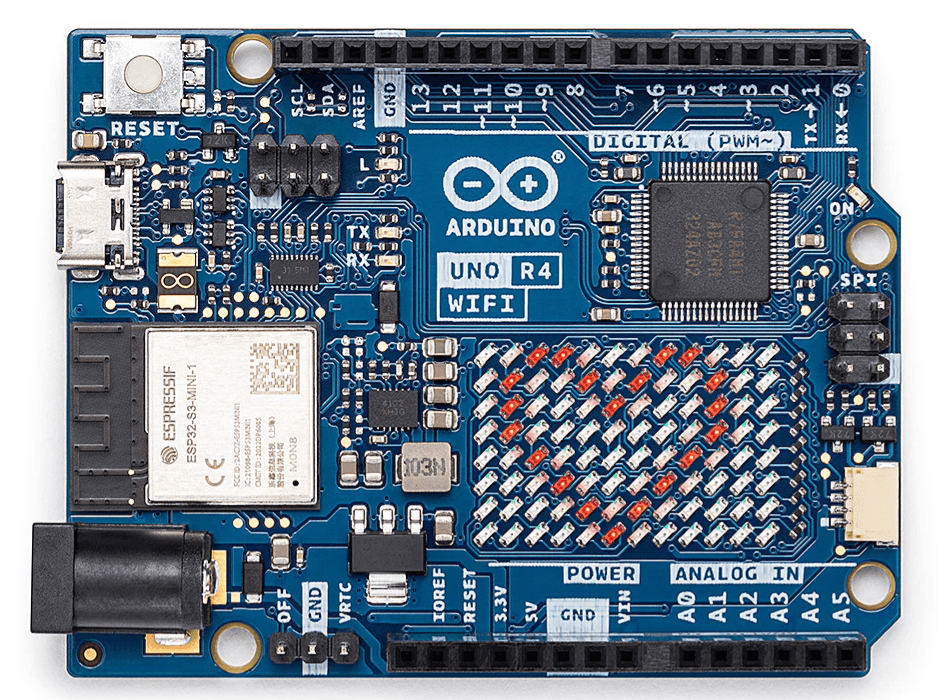
El Arduino UNO R4 WiFi combina la capacidad de procesamiento y los nuevos periféricos del microcontrolador RA4M1 de Renesas con la conectividad inalámbrica del ESP32-S3 de Espressif. Además, el UNO R4 WiFi ofrece una matriz LED de 12x8 integrada, conector Qwiic, VRTC y pin OFF, cubriendo todas las necesidades que los makers puedan tener para su próximo proyecto.
Con el UNO R4 WiFi, usted puede mejorar fácilmente su proyecto y agregar conectividad inalámbrica para ampliar el alcance de su configuración actual. Si este es su primer proyecto, esta tarjeta tiene todo lo que necesita para despertar su creatividad.
Veamos lo que ofrece el UNO R4 WiFi:
- Compatibilidad de hardware con el formato UNO: el UNO R4 WiFi mantiene el mismo formato, distribución de pines y voltaje de operación de 5 V que su predecesor, el UNO R3, lo que garantiza una transición sin problemas para shields y proyectos existentes.
- Más memoria y reloj más rápido: el UNO R4 WiFi cuenta con mayor memoria y una velocidad de reloj más alta, lo que permite cálculos más precisos y manejar sin esfuerzo proyectos complejos.
- Periféricos adicionales integrados: el UNO R4 WiFi incorpora una serie de periféricos integrados, incluyendo un DAC de 12 bits, CAN BUS y OP AMP, que brindan mayores capacidades y flexibilidad de diseño.
- Tolerancia extendida a 24 V: el UNO R4 WiFi admite un rango más amplio de voltaje de entrada, lo que permite integrar motores, tiras LED y otros actuadores usando una sola fuente de poder.
- Soporte HID: con soporte HID integrado, el UNO R4 WiFi puede simular un mouse o un teclado al conectarse a una computadora por USB, lo que facilita enviar pulsaciones de teclas y movimientos del mouse.
- Wi-Fi® y Bluetooth®: el UNO R4 WiFi incluye un módulo ESP32-S3 que permite a los makers agregar conectividad inalámbrica a sus proyectos. En combinación con Arduino IoT Cloud, los makers pueden monitorear y controlar sus proyectos de forma remota.
- Conector Qwiic: el UNO R4 WiFi cuenta con un conector Qwiic I2C que permite conectar fácilmente nodos del amplio ecosistema Qwiic. Los cables adaptadores también permiten la compatibilidad con sensores y actuadores basados en otros conectores.
- Soporte para RTC alimentado por batería: el UNO R4 WiFi incluye pines adicionales, entre ellos un pin "OFF" para apagar la tarjeta y un pin "VRTC" para mantener alimentado y en funcionamiento el reloj de tiempo real (RTC) interno.
- Matriz LED: el UNO R4 WiFi incorpora una brillante matriz LED roja de 12x8, ideal para proyectos creativos con animaciones o para graficar datos de sensores, sin necesidad de hardware adicional.
- Diagnóstico de errores en tiempo de ejecución: el UNO R4 WiFi incluye un mecanismo de captura de errores que detecta fallos en tiempo de ejecución y brinda explicaciones detalladas y pistas sobre la línea de código que causa el fallo.
Con todas estas características en el conocido formato UNO, este es el momento perfecto para mejorar su proyecto o iniciar su camino como maker. El UNO R4 WiFi ofrece una versatilidad y posibilidades incomparables para makers de todos los niveles.
Compatible con Arduino IoT Cloud

Especificaciones
Microcontrolador: Renesas RA4M1 (Arm® Cortex®-M4)
Puerto USB C y de programación
Pines de propósito general
- Pines digitales de E/S: 14
- Pines analógicos: 6
- DAC: 1
- Pines PWM: 6
Comunicación
- UART x1
- I2C x1
- SPI x1
- CAN Bus x1
Alimentación
- Voltaje de operación del circuito: 5 V (el ESP32-S3 es de 3.3 V)
- Voltaje de entrada: (VIN) 6-24 V
- Corriente DC por pin de E/S: 8 mA
Velocidad de reloj
- Núcleo principal 48 MHz
- ESP32-S3 hasta 240 MHz
Memoria:
- RA4M1: 256 kB Flash, 32 kB RAM
- ESP32-S3: 384 kB ROM, 512 kB SRAM
Dimensiones de la tarjeta:
- Ancho 68.85 mm
- Largo 53.34 mm
Documentos
Para la documentación técnica completa, tutoriales y mucho más, visite Arduino Docs
Preguntas frecuentes de Arduino
¿Puedo usar hardware compatible con el Arduino UNO R3 con el Arduino UNO R4 WiFi?
Sí, el Arduino UNO R4 WiFi fue diseñado específicamente para garantizar la compatibilidad con shields anteriores y hardware compatible desarrollado para el Arduino UNO R3. El UNO R4 WiFi mantiene la misma compatibilidad mecánica y eléctrica, lo que le permite usar sin problemas sus shields y hardware existentes con la nueva tarjeta. Esto facilita la actualización al UNO R4 WiFi sin necesidad de cambios o adaptaciones significativas en sus proyectos.
¿Puedo usar hardware compatible con el Arduino UNO WiFi Rev2 con el Arduino UNO R4 WiFi?
Sí, el Arduino UNO R4 WiFi es totalmente compatible con shields y hardware anteriores desarrollados para el UNO WiFi Rev2. Ambas tarjetas comparten el mismo formato UNO y el voltaje de operación de 5 V. Sin embargo, es importante tener en cuenta que, según el diseño, puede haber cambios en los elementos de la distribución de pines. Consulte la documentación y los diagramas de pines para conocer detalles específicos y consideraciones de compatibilidad.
¿Puedo usar en el UNO R4 mi sketch desarrollado para el UNO R3?
Sí, si su sketch fue desarrollado usando la Arduino API. En caso de que esté usando instrucciones disponibles solo para la arquitectura AVR, se deben hacer algunos cambios para garantizar la compatibilidad.
¿Todas las bibliotecas compatibles con el UNO R3 también son compatibles con el UNO R4 WiFi?
No, algunas bibliotecas del UNO R3 usan instrucciones de la arquitectura AVR que no son compatibles con la arquitectura del UNO R4 WiFi; sin embargo, hay bibliotecas que ya han sido portadas como parte de nuestro programa de usuarios pioneros o que están basadas en la Arduino API.
¿Qué es la matriz LED integrada del Arduino UNO R4 WiFi y cómo puedo usarla?
La matriz LED integrada es una matriz roja de 12x8 (96 puntos) totalmente direccionable que utiliza Charlieplexing para controlar cada punto de forma individual. Para comenzar, simplemente descargue el core “Arduino UNO R4 boards”. Esto le dará acceso a la sencilla API Arduino_LED_Matrix, que le permite programar y controlar la matriz LED. Puede encontrar más información aquí.
¿Hay herramientas disponibles para ayudar a crear animaciones para la matriz LED?
¡Por supuesto! Arduino desarrolló una herramienta gráfica diseñada específicamente para ayudar a los makers a crear y exportar sus propias animaciones. Así, usted puede dar rienda suelta a su creatividad y aprovechar al máximo esta función. Encuentre más información en el sitio web de Arduino Labs.
The Arduino UNO R4 WiFi combines the processing power and exciting new peripherals of the RA4M1 microcontroller from Renesas with the wireless connectivity power of the ESP32-S3 from Espressif. On top of this, the UNO R4 WiFi offers an on-board 12x8 LED matrix, Qwiic connector, VRTC, and OFF pin, covering all potential needs makers will have for their next project.
With the UNO R4 WiFi, you can easily upgrade your project and add wireless connectivity to expand the reach of your current setup. If this is your first project, this board has everything you need to spark your creativity.
Let's explore what the UNO R4 WiFi has to offer:
- Hardware compatibility with UNO form factor: The UNO R4 WiFi maintains the same form factor, pinout, and 5 V operating voltage as its predecessor, the UNO R3, ensuring a seamless transition for existing shields and projects.
- Expanded memory and faster clock: The UNO R4 WiFi boasts increased memory and a faster clock speed, enabling more precise calculations and effortless handling of complex projects.
- Extra on-board peripherals: The UNO R4 WiFi introduces a range of on-board peripherals, including a 12-bit DAC, CAN BUS, and OP AMP, providing expanded capabilities and design flexibility.
- Extended 24 V tolerance: The UNO R4 WiFi supports a wider input voltage range, allowing seamless integration with motors, LED strips, and other actuators using a single power source.
- HID support: With built-in HID support, the UNO R4 WiFi can simulate a mouse or keyboard when connected to a computer via USB, making it easy to send keystrokes and mouse movements.
- Wi-Fi® and Bluetooth®: The UNO R4 WiFi hosts an ESP32-S3 module, enabling makers to add wireless connectivity to their projects. Combined with the Arduino IoT Cloud, makers can monitor and control their projects remotely.
- Qwiic connector: The UNO R4 WiFi features a Qwiic I2C connector, allowing easy connection to nodes from the extensive Qwiic ecosystem. Adapter cables also enable compatibility with sensors and actuators based on other connectors.
- Support for battery-powered RTC: The UNO R4 WiFi includes additional pins, including an "OFF" pin to turn off the board and a "VRTC" pin to keep the internal Real-Time Clock powered and running.
- LED matrix: The UNO R4 WiFi incorporates a bright 12x8 red LED matrix, ideal for creative projects with animations or plotting sensor data, eliminating the need for additional hardware.
- Diagnostics for runtime errors: The UNO R4 WiFi includes an error-catching mechanism that detects runtime crashes and provides detailed explanations and hints about the code line causing the crash.
With all these features packed into the well-known UNO form factor, now is the perfect time to upgrade your project or embark on your maker journey. The UNO R4 WiFi offers unparalleled versatility and possibilities for makers of all levels.
Arduino IoT Cloud Compatible
Specifications
Microcontroller: Renesas RA4M1 (Arm® Cortex®-M4)
USB C & Programming port
General Purpose Pins
- Digital I/O pins: 14
- Analog Pins: 6
- DAC: 1
- PWM pins: 6
Communication
- UART x1
- I2C x1
- SPI x1
- CAN Bus x1
Power
- Circuit operating voltage: 5 V (ESP32-S3 is 3.3 V)
- Input voltage: (VIN) 6-24 V
- DC Current per: I/O Pin 8 mA
Clock Speed
- Main core 48 MHz
- ESP32-S3 up to 240 MHz
Memory:
- RA4M1: 256 kB Flash, 32 kB RAM
- ESP32-S3: 384 kB ROM, 512 kB SRAM
Board dimensions:
- Width 68.85 mm
- Length 53.34 mm
Documents
For the full technical documentation, tutorials and much more, visit Arduino Docs
Arduino FAQ
Can I use hardware compatible with the Arduino UNO R3 with the Arduino UNO R4 WiFi?
Yes, the Arduino UNO R4 WiFi was specifically designed to ensure compatibility with previous shields and compatible hardware developed for the Arduino UNO R3. The UNO R4 WiFi maintains the same mechanical and electrical compatibility, allowing you to seamlessly use your existing shields and hardware with the new board. This makes it easy to upgrade to the UNO R4 WiFi without the need for significant changes or adaptations to your projects.
Can I use hardware compatible with the Arduino UNO WiFi Rev2 with the Arduino UNO R4 WiFi?
Yes, the Arduino UNO R4 WiFi is fully compatible with previous shields and hardware developed for the UNO WiFi Rev2. Both boards share the same UNO form factor and 5 V operating voltage. However, it's important to note that depending on the design, there may be changes in the pinout elements. Please refer to the documentation and pinout diagrams for specific details and compatibility considerations.
Can I use my sketch developed for the UNO R3 in the UNO R4?
Yes, if your sketch was developed using the Arduino API. In case you are using instructions only available for the AVR architecture, some changes need to be made to ensure compatibility.
Are all libraries compatible with the UNO R3 also compatible with the UNO R4 WiFi?
No, some UNO R3 libraries use instructions of the AVR architecture that are not compatible with the architecture of the UNO R4 WiFi, however there are libraries that have already been ported as part of our early adopters program or are based on the Arduino API.
What is the on-board LED Matrix on the Arduino UNO R4 WiFi and how can I use it?
The on-board LED Matrix is a fully addressable 12x8 (96 points) red matrix that utilizes Charlieplexing to individually control each point. To get started, simply download the “Arduino UNO R4 boards” core. This will grant you access to the user-friendly Arduino_LED_Matrix API, allowing you to program and control the LED Matrix. More information can be found here.
Are there any tools available to assist with creating animations for the LED Matrix?
Absolutely! Arduino developed a graphic tool specifically designed to help makers create and export their own animations. This way, you can unleash your creativity and make the most of this exciting feature. Find more information on the Arduino Labs website.